

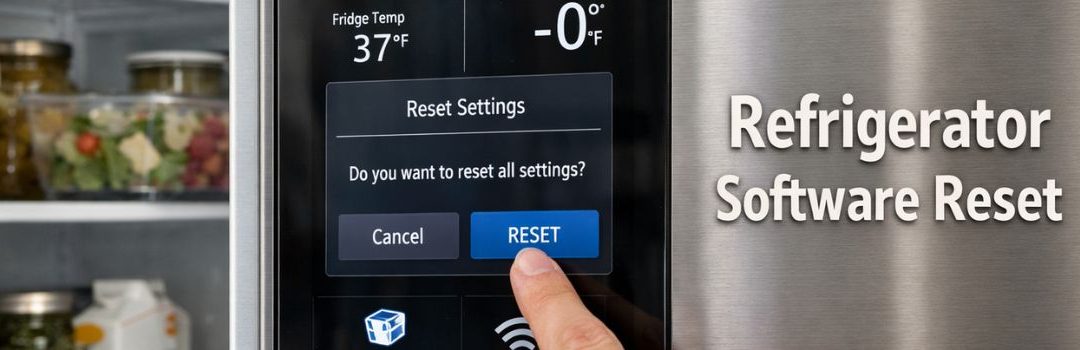
Understanding the software reset procedures for modern refrigerators is essential for maintaining their optimal performance. As leak prone refrigerators become increasingly sophisticated with integrated digital controls, software glitches can occasionally occur, affecting functionality. Knowing how to perform a software reset can help quickly resolve common issues such as unresponsive touchscreens, erratic temperature readings, or failure to start cooling.
For residents and appliance users in Langley, being familiar with these reset procedures can save time and avoid unnecessary service calls. It ensures that minor software problems are handled efficiently, keeping your refrigerator running smoothly and extending its lifespan.
Understanding Refrigerator Software Resets
What is a Software Reset?
A software reset is a process that restarts the refrigerator’s control system to fix minor glitches or errors in its operation. It essentially reboots the internal software that manages functions like temperature control, defrost cycles, and user interface responsiveness. The purpose of a software reset is to restore normal function without affecting the appliance’s stored settings or data.
There are different types of resets to consider:
- Soft Reset: This is a simple restart of the refrigerator’s software, typically done by unplugging the appliance for a short time or using a dedicated reset button. It clears temporary errors but preserves settings.
- Hard Reset: A more thorough reboot that may involve disconnecting power for a longer duration or pressing a combination of buttons. It clears more persistent errors but usually retains user settings.
- Factory Reset: This restores the refrigerator’s software to its original factory settings. It clears all user preferences, custom settings, and sometimes logs or error codes. This reset is more drastic and used when other resets fail.
When to Perform a Reset
Performing a software reset can resolve several common issues with refrigerators. Consider a reset if you experience:
- Unresponsive control panels or buttons
- Error codes displayed that do not clear
- Temperature inconsistencies, such as the fridge or freezer not cooling properly despite correct settings
- Unexpected or frequent defrost cycles
Before performing any reset, take the following precautions:
- Check the user manual for model-specific reset instructions
- Note any custom settings you may need to re-enter after the reset
- Ensure the refrigerator door is closed properly during the reset
- Avoid resetting repeatedly in a short period, as this may cause further errors or hardware issues
By understanding what a software reset entails and recognizing when it is necessary, you can effectively troubleshoot and maintain your refrigerator’s performance.
Types of Resets and Their Procedures
Soft Reset
A soft reset usually involves turning the refrigerator off and then back on. This simple step can often resolve minor issues by refreshing the system without affecting any settings or stored data. It is the first and easiest troubleshooting method to try when the refrigerator is not functioning correctly.
Hard Reset
A hard reset is a more thorough process that resets the refrigerator’s control board or system. It can clear more persistent errors that a soft reset cannot fix. The hard reset process varies by brand and model.
For example, the Lippert RV Refrigerator hard reset involves specific steps to power cycle and reset the system. According to the Lippert Customer Care Center, the process includes turning off the refrigerator, unplugging it from the power source, waiting for a designated period, and then powering it back on. This procedure is applicable to many similar RV and residential refrigerator models, making it a useful method for troubleshooting various units.
Factory Reset
A factory reset restores the refrigerator to its original factory settings. This type of reset is useful when there are complex software issues or after significant changes have been made to the settings that need to be undone.
For Samsung refrigerators, the control reset procedure involves navigating the control panel to reset all settings back to default. Detailed instructions can be found on the Samsung Support site.
Similarly, Henny Penny appliances provide a factory reset option to clear faults and return the appliance to its original configuration.
Using a factory reset should be done cautiously, as it will erase personalized settings and preferences.
Brand-Specific Reset Procedures
Langley-Relevant Refrigerator Brands
In Langley, some of the most popular refrigerator brands include Samsung, LG, Whirlpool, GE, and RV-specific brands such as Lippert. Each brand has its unique reset procedures to help resolve common issues.
Samsung
To reset a Samsung refrigerator, start by unplugging the appliance from the power source. Wait for about 5 minutes to allow the system to fully power down. Then, plug it back in and press and hold the ‘Power Freeze’ and ‘Power Cool’ buttons simultaneously for 10 seconds until the display panel resets. This process clears minor glitches related to temperature settings or ice maker errors.
If the reset does not resolve the issue, check the control lock feature, as it may be accidentally activated. Press and hold the ‘Control Lock’ button for 3 seconds to disable it. Also, ensure the refrigerator doors are closed properly, as sensors may prevent normal operation if doors are ajar.
LG
LG refrigerators offer both a soft reset and a factory reset option. For a soft reset, unplug the refrigerator for 5 minutes and then plug it back in. This action resets the control board without affecting user settings.
For a factory reset, press and hold the ‘Door Alarm’ and ‘Energy Saver’ buttons simultaneously for 10 seconds. This clears all customized settings and restores factory defaults, which can solve more complex system errors. Note that a factory reset should be used with caution as it erases user preferences.
Whirlpool and GE
Whirlpool and GE refrigerators often share similar reset methods. A common approach is to unplug the refrigerator for at least 5 minutes to reset the control board. After plugging it back in, press the ‘Reset’ button on the control panel if available, or hold the ‘Power’ button for 10 seconds to initiate a reset.
If problems persist, consult the user manual for model-specific instructions, as some units may require pressing a sequence of buttons to enter diagnostic mode for deeper troubleshooting.
Lippert (RV Refrigerators)
For Lippert RV refrigerators, a hard reset can be performed by disconnecting the refrigerator from both AC and DC power sources. Wait for at least 5 minutes to ensure all capacitors fully discharge.
After this, reconnect the power sources and turn the refrigerator on. This resets the control board and can resolve issues like failure to start or error codes. Detailed instructions and support are available via the Lippert Customer Care Center, which is a valuable resource for Langley RV owners dealing with refrigerator problems.
Troubleshooting Common Issues with Software Resets
When performing a software reset on your Langley refrigerator, you may encounter some common issues. Understanding these problems and how to address them can help ensure your appliance runs smoothly.
Refrigerator Not Cooling
If your refrigerator is not cooling after a software reset, first check that the power supply is stable and the unit is properly plugged in. Ensure that the temperature settings are correctly adjusted. Sometimes, the compressor may need a few minutes to restart and stabilize. If the problem persists, the reset may not have resolved an underlying mechanical or sensor issue that requires professional service.
Display/Control Panel Not Responding
A non-responsive display or control panel could indicate a software glitch or a problem with the control board. After performing a reset, if the panel still does not respond, try unplugging the refrigerator for 5-10 minutes to allow a deeper reset. If the issue continues, the control panel or its connections might be faulty.
Error Codes and Their Meanings
Langley refrigerators often display error codes to indicate specific problems. Common codes include:
- E1: Temperature sensor failure
- E2: Defrost sensor issue
- E3: Fan motor malfunction
Refer to your refrigerator’s manual for a comprehensive list of error codes and their meanings. These codes help pinpoint the exact problem, making troubleshooting more efficient.
Steps to Take if Reset Does Not Resolve the Issue
If a software reset does not fix the problem, follow these steps:
- Double-check connections: Ensure all plugs and connectors inside the fridge are secure.
- Consult the user manual: Look for specific troubleshooting tips related to your model.
- Perform a hard reset: Unplug the refrigerator for at least 10 minutes before plugging it back in.
- Contact customer support: If issues persist, reach out to Langley’s customer service for professional assistance.
- Schedule a service visit: Some problems may require a technician to inspect and repair hardware components.
Addressing these common issues promptly can help maintain your Langley refrigerator’s performance and prolong its lifespan.
Tools and Resources for Langley Residents
Local Repair and Support Services
For residents in Langley, BC, Priority Appliance Service offers reliable appliance repair and support tailored for various refrigerator brands and models. They provide expert assistance when a software reset is insufficient or if the appliance requires professional diagnostics and repairs. Knowing when to call professional help is crucial: if a simple reset does not resolve the issue or if the refrigerator shows signs of hardware malfunction, it’s best to consult with trained technicians to avoid further damage.
Online Resources and Manuals
Accessing the user manual specific to your refrigerator model is one of the first steps in performing a software reset correctly. Manuals often contain detailed reset procedures and troubleshooting tips. Manufacturer support websites also provide valuable resources, including firmware updates and FAQs that can guide you through common problems.
For smart refrigerators, specialized troubleshooting guides like those found at Nika Appliance Repair offer step-by-step instructions to address software-related issues. These guides can help users navigate complex smart appliance systems and perform resets safely and effectively.
By combining local professional services with comprehensive online resources, Langley residents can effectively manage refrigerator software resets and maintenance.
Best Practices and Tips for Maintaining Refrigerator Software Health
Maintaining the software health of your refrigerator is essential for ensuring optimal performance and longevity. Here are some best practices to keep in mind:
Regular Updates
Where applicable, regularly updating your refrigerator’s software or firmware is crucial. Manufacturers often release updates that fix bugs, improve energy efficiency, and add new features. Check the Langley brand’s official website or your appliance’s settings menu periodically to see if updates are available.
Avoiding Unnecessary Resets
While software resets can resolve some issues, frequent or unnecessary resets may disrupt the appliance’s normal operation. Only perform a reset when troubleshooting a specific problem, and follow the manufacturer’s recommended procedures to avoid causing further issues.
Keeping Firmware Updated
Firmware serves as the low-level software that controls your refrigerator’s hardware functions. Keeping it up to date helps maintain system stability and compatibility with other smart home devices if applicable. Use authorized sources to download and install firmware updates to prevent software corruption.
Monitoring Appliance Performance
Regularly monitor your refrigerator’s performance indicators, such as temperature stability, cooling efficiency, and error codes. Many models provide diagnostic tools or alerts that help identify potential software-related issues early, allowing you to address them before they escalate.
By following these tips, you can ensure your Langley refrigerator’s software remains healthy, contributing to the appliance’s overall reliability and efficiency.
Conclusion
For Langley residents, performing a refrigerator software reset involves following key procedures that vary depending on the specific model of the appliance. It is essential to refer to the manufacturer’s instructions to ensure the reset is done correctly and safely. Taking the time to understand these model-specific steps helps avoid potential damage and ensures the refrigerator functions properly after the reset.
When in doubt, or if the reset process seems complicated, utilizing local resources such as authorized service centers or professional repair technicians in Langley is highly recommended. These experts can provide guidance or hands-on assistance, ensuring your refrigerator is restored efficiently and effectively.

LET’S CONNECT
OPEN HOURS
Mon-Fri: 8AM-6PM
Saturday: 10AM-6PM
Sunday: 10AM-6PM
QUICK LINKS:
LET’S CONNECT
(778) 600-1787
service@langleyappliancesrepair.ca
OPEN HOURS
Mon-Fri: 8AM-6PM
Saturday: 10AM-6PM
Sunday: 10AM-6PM
QUICK LINKS:
© 2025 Langley Appliances Repair All Rights Reserved | Privacy Policy | Sitemap