

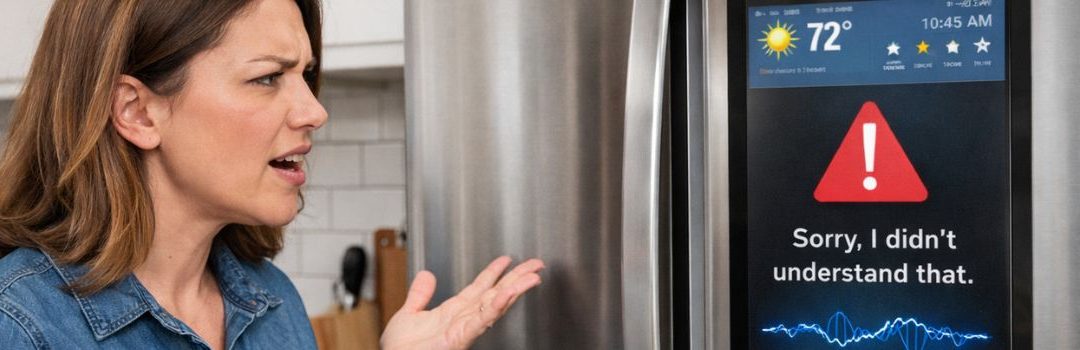
Smart fridges have become an integral part of modern kitchens, combining traditional refrigeration with advanced technology. One of their most notable features is voice control, which allows users to interact with their appliances hands-free. This capability enables tasks such as checking the contents of the fridge, setting reminders, adjusting temperature settings, and even adding items to a shopping list simply by speaking commands.
Voice control enhances user convenience by making everyday kitchen tasks more efficient and seamless. It also plays a significant role in smart home integration, where multiple devices communicate and operate together to create a connected living environment. For many users, being able to control their fridge with voice commands reduces the need to physically interact with the appliance, which is especially useful when hands are full or dirty. At times, underlying hardware problems like loose fridge wires may interrupt connectivity or power supply to key components, leading to performance inconsistencies.
However, users in Langley and similar regions frequently experience issues with voice control not working on their smart fridges. These problems can disrupt the smooth functioning of the appliance and diminish the overall smart home experience. Understanding these challenges is essential to finding effective solutions and ensuring that the benefits of voice-controlled smart fridges are fully realized.
Understanding Voice Control Systems in Smart Fridges
How Voice Recognition Works
Smart fridges equipped with voice control use a combination of hardware and software to recognize and respond to user commands. At the core is a microphone array, which captures sound from the environment. This array uses voice detection technology to filter out background noise and focus on the user’s voice. When the fridge detects a specific wake word, such as ‘Hey Bixby’ or ‘Alexa,’ it activates its listening mode. After activation, the voice command is processed by the fridge’s internal system or sent to external cloud services for interpretation and response.
Popular Voice Assistants Used
Several voice assistants are commonly integrated into smart fridges. Samsung’s Bixby is often found in Samsung smart refrigerators, offering tailored features for kitchen use. Amazon Alexa and Google Assistant are also popular options, known for their wide range of skills and compatibility with other smart home devices. When choosing a smart fridge, it’s important to consider which voice assistant it supports, as compatibility affects the available features and how well the voice control functions within your existing smart home ecosystem.
Common Causes of Voice Control Failures
Hardware-Related Issues
One of the primary reasons voice control may fail on smart fridges is due to hardware problems. A malfunctioning or blocked microphone can prevent the fridge from accurately detecting voice commands. Similarly, issues with the speaker can affect the feedback users receive, making it hard to know if commands were recognized.
Software and Configuration Problems
Voice control might also fail because of software or settings issues. If the wake word or voice recognition settings are incorrect, the fridge won’t respond properly. Additionally, outdated firmware or app software can cause compatibility problems that disrupt voice functionality.
Connectivity Challenges
Stable internet connection is crucial for voice control. Wi-Fi instability or frequent disconnections can prevent commands from being processed. Network security settings, such as firewalls or restricted access, might also interfere with communication between the fridge and voice services.
Environmental Factors
External factors around the fridge can impact voice control. Background noise can interfere with the microphone’s ability to pick up commands accurately. Furthermore, the placement of the fridge—such as in a noisy or enclosed space can reduce microphone sensitivity and affect overall performance.
Troubleshooting Voice Control Problems
Checking and Adjusting Microphone Settings
First, make sure the microphone on your smart fridge is enabled and not blocked by any objects or dirt. A covered or dirty microphone can prevent your voice commands from being recognized. To test the microphone functionality, try speaking directly to the fridge and see if it responds or use any built-in test options available in the fridge’s settings menu.
Wake Word Configuration
Verify that the correct wake word is set up for your smart fridge. Sometimes the voice assistant may not respond if it is listening for a different wake word. If the fridge consistently fails to recognize the wake word, consider re-training the voice recognition feature by following the instructions in the user manual or app.
Wi-Fi Connectivity
Stable Wi-Fi is crucial for voice control to work properly. Check your Wi-Fi network’s stability and ensure that the fridge is connected without interruptions. If problems persist, try reconnecting the fridge to the Wi-Fi network or resetting the network settings. Also, make sure the fridge is within the effective range of your Wi-Fi router to maintain a strong signal.
Firmware and Software Updates
Keeping your smart fridge’s firmware up to date can resolve many voice control issues. Check for the latest firmware updates and install them as soon as they are available. Additionally, update any companion smartphone apps used to control or configure the fridge to ensure compatibility and improved performance.
Restarting and Resetting Devices
Perform a soft reboot of your smart fridge by turning it off and on again. This simple step can often fix minor glitches affecting voice control. If problems continue, a factory reset might be necessary, but use this as a last resort since it will erase all stored settings and data.
Advanced Solutions and Tips
Using Voice Assistants Remotely
One effective way to manage your smart fridge’s voice control is by setting up remote voice assistants. This allows you to control your fridge even when you’re not physically near it. By integrating voice assistants through your smartphone or other devices, you can issue commands from anywhere, ensuring your smart fridge responds promptly to your needs. Detailed steps for remote setup can be found on Alibaba’s guide to controlling smart bar fridges remotely with voice assistants.
Clear Communication Techniques
Voice command recognition often fails due to unclear speech or rapid talking. To improve command accuracy, speak clearly and maintain a moderate pace. Avoid mumbling or rushing your words, as this can lead to misinterpretation by the voice assistant. Consistent enunciation helps the smart fridge understand and execute commands correctly. Home Automation Magazine emphasizes the importance of clear communication to resolve common voice control problems.
Community-Sourced Fixes
User communities often provide practical solutions for device-specific issues. Samsung Community users have shared various tips to resolve Alexa voice control problems on Samsung refrigerators. These include troubleshooting connection settings, updating firmware, and resetting the voice assistant integration. Engaging with such communities can offer real-world fixes that manufacturers might not highlight. For detailed user experiences and solutions, visit the Samsung Community discussion on Alexa voice issues.
Preventative Measures
Regular Maintenance
One of the simplest yet most effective ways to ensure your smart fridge’s voice control works properly is by regularly maintaining the microphone area. Dust, dirt, and other obstructions can interfere with sound detection, causing the fridge to miss or misinterpret voice commands. Clean the microphone gently with a soft, dry cloth and avoid placing objects near it that could block sound waves.
Network Management
A stable and strong Wi-Fi connection is crucial for the voice control feature on smart fridges to function correctly. Ensure your fridge is connected to a reliable network with a strong signal. Position your router close enough to the fridge or consider using Wi-Fi extenders to boost the signal. Additionally, avoid network congestion by limiting the number of devices connected simultaneously or scheduling high-bandwidth activities at different times. This will help maintain consistent communication between your fridge and the voice control servers.
Keeping Firmware and Apps Updated
Regularly updating your smart fridge’s firmware and any related apps is essential. Manufacturers often release updates to fix bugs, improve voice recognition accuracy, and enhance overall performance. Check for updates through the fridge’s settings menu or the companion app, and install them promptly to keep the voice control feature running smoothly.
When to Seek Professional Assistance
If your smart fridge’s voice control is consistently unresponsive or malfunctioning despite basic troubleshooting, it might be due to a hardware fault. Common hardware issues include damaged microphones, faulty speakers, or internal connectivity problems within the appliance. These issues typically require professional diagnosis and repair to ensure proper functioning.
In Langley, you can find specialized appliance repair services that focus on smart appliances. For reliable support, consider contacting local experts like North Vancouver Appliance Repair. They have experience in understanding and fixing connectivity and hardware issues in smart devices, including smart fridges.
Seeking professional assistance early can prevent further damage and restore your smart fridge’s voice control feature effectively.
Conclusion
When facing issues with voice control not working on smart fridges in Langley, start by checking the basics: ensure your fridge is connected to Wi-Fi, verify that the microphone and voice assistant settings are enabled, and perform a restart of the device. Updating the fridge’s firmware and your connected apps often resolves compatibility problems. If these steps don’t work, resetting the voice assistant or performing a factory reset may help.
Don’t hesitate to use both official support channels and community forums. Manufacturer support can provide expert guidance and updates, while user communities often share practical solutions and tips based on real-world experiences.
Maintaining your smart fridge through regular updates, proper network management, and cleaning the microphone area will help keep voice control functioning smoothly. Ongoing maintenance is key to preventing future issues and ensuring you get the most out of your smart appliance.

LET’S CONNECT
OPEN HOURS
Mon-Fri: 8AM-6PM
Saturday: 10AM-6PM
Sunday: 10AM-6PM
QUICK LINKS:
LET’S CONNECT
(778) 600-1787
service@langleyappliancesrepair.ca
OPEN HOURS
Mon-Fri: 8AM-6PM
Saturday: 10AM-6PM
Sunday: 10AM-6PM
QUICK LINKS:
© 2025 Langley Appliances Repair All Rights Reserved | Privacy Policy | Sitemap