

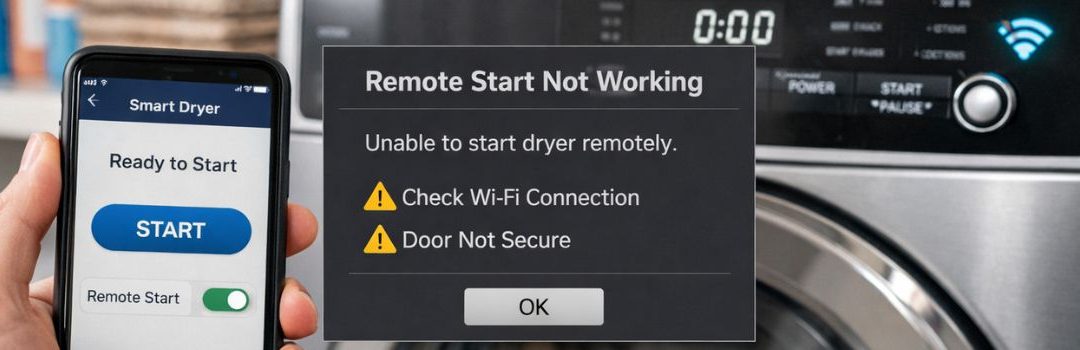
Common Causes of Smart Dryer Remote Start Malfunctions in Langley
Smart dryers have become increasingly popular due to their advanced features, including the ability to start and control drying cycles remotely through a smartphone app. This remote start functionality allows users to conveniently operate their dryers without needing to be physically present, making laundry tasks more flexible and manageable. Proper setup and connectivity are crucial for the smooth operation of this remote feature, ensuring users can rely on it whenever needed.
The remote start feature is not only about convenience but also contributes to energy efficiency. Users can schedule drying cycles to run during off-peak energy hours, reducing electricity costs and environmental impact. This ability to manage laundry remotely suits busy lifestyles and promotes smarter energy use.
However, many users in the Langley area have reported issues with their smart dryers’ remote start function not working as expected. These problems can disrupt the convenience and efficiency that smart dryers are supposed to provide, making it important to understand the common causes and solutions for remote start malfunctions in this region.
Understanding LG Dryer Remote Start Functionality
How Remote Start Works
To activate the remote start feature on an LG dryer, press and hold the Remote Start button for at least 3 seconds. This initiates the dryer to begin its cycle remotely, allowing for convenient operation without physically being near the appliance. The remote start function is integrated with the LG SmartThinQ app, which enables users to control and monitor their dryer from their smartphone. Through the app, you can start, pause, or stop the dryer, as well as receive notifications about the cycle status.
Technical Requirements
For the remote start feature to work effectively, the LG dryer must be connected to a stable Wi-Fi network. A reliable internet connection ensures seamless communication between the dryer and the SmartThinQ app on your smartphone. Additionally, your smartphone must be compatible with the LG SmartThinQ app, and it is important to keep the app updated to the latest version to avoid connectivity or functionality issues. Meeting these technical requirements is essential for the remote start feature to function properly.
Common Causes of Remote Start Not Working
Connectivity Issues
One of the primary reasons a smart dryer remote start might not work is due to connectivity problems. Weak or unstable Wi-Fi signals can interfere with the ability to send remote commands to the dryer, making it unresponsive. This is especially common in homes with poor network coverage or interference. Additionally, router or network configuration issues can prevent the dryer from connecting properly to the home network. Sometimes, firmware or software glitches in either the dryer itself or the controlling app can disrupt communication and cause remote start failures.
Hardware and Component Failures
Hardware malfunctions can also stop the remote start function from working. A faulty electronic control board is a common culprit, as it manages the dryer’s operations and responds to remote commands. If this board is defective, the dryer may not respond at all to remote start attempts. Another frequent issue is a defective door switch; if the dryer door is not properly closed or the switch is malfunctioning, the dryer will not start for safety reasons. Similarly, a malfunctioning start switch can prevent the dryer from initiating a cycle even if the remote command is received.
Remote Control Factors
Sometimes, the problem lies with the remote control itself. If the remote is out of its effective range, typically recommended between 0.5 meters to 1.0 meter from the dryer, the signal may not reach the dryer to initiate the start. Battery issues in the remote control can also cause weak or no signal transmission. Furthermore, physical obstructions such as walls, furniture, or other electronic devices can interfere with the remote signal, preventing the dryer from receiving the start command.
Diagnosing Remote Start Problems
Step-by-Step Troubleshooting Guide
- Verify dryer is connected to Wi-Fi and SmartThinQ app: Ensure your dryer is properly connected to your home Wi-Fi network and linked to the LG SmartThinQ app. A poor or lost connection will prevent remote start from working.
- Check remote start button operation on dryer panel: Test the remote start button directly on the dryer’s control panel to confirm it is functioning correctly. If the button is unresponsive, there may be a hardware issue.
- Confirm remote control batteries and range: If you use a remote control device for starting the dryer, check that its batteries are charged and that you are within the effective operational range.
- Inspect door switch and start switch for faults: The dryer’s door switch and start switch must be working for remote start to engage. Faulty switches can prevent the dryer from starting remotely.
- Restart router and dryer to resolve connectivity issues: Sometimes, restarting your Wi-Fi router and the dryer can fix communication problems between the devices.
- Check for firmware updates on dryer and app: Make sure both the dryer’s firmware and the SmartThinQ app are updated to the latest versions, as updates often fix bugs affecting remote start.
Using Diagnostic Tools and Error Codes
- Understanding error messages related to remote start failure: Pay attention to any error codes or messages displayed on the dryer or within the app. These codes can give specific insights into the cause of the remote start failure.
- Utilizing LG app diagnostics features: The LG SmartThinQ app includes diagnostic tools that can help identify issues remotely. Use these features to run tests and gather information to aid in troubleshooting.
Repair and Maintenance Options in Langley
When to Contact Professionals
If your smart dryer remote start is not working due to persistent hardware faults or complex connectivity and firmware issues, it’s best to contact a professional. These problems often require specialized tools and expertise that go beyond basic troubleshooting.
Local Repair Services
Langley has several appliance repair providers that specialize in dryer repairs, including smart models. One reputable option is Starfix, which offers dryer repair services in both Langley and Surrey. They are experienced in handling various dryer issues, including those related to smart technology and connectivity.
DIY Maintenance Tips
To help prevent problems with your smart dryer’s remote start feature, consider these maintenance tips:
- Regularly update both the dryer’s firmware and the associated app to ensure compatibility and fix bugs.
- Keep your Wi-Fi router optimized for smart devices by maintaining strong signal strength and minimizing interference.
- Clean dryer sensors and components frequently to avoid sensor malfunctions that can affect remote operations.
Following these steps can reduce the likelihood of issues and help maintain smooth remote start functionality.
Conclusion
When your smart dryer remote start is not working across Langley, start by checking your Wi-Fi connection, ensuring your device and app firmware are up to date, and verifying that the dryer is properly connected to the network. Restarting your router and dryer can often resolve temporary glitches. If these steps do not solve the problem, inspect the hardware for any visible damage or issues.
If troubleshooting on your own does not restore remote functionality, it is advisable to seek professional services. Certified technicians have the expertise to diagnose and fix more complex connectivity or hardware problems effectively.
Maintaining a stable Wi-Fi connection and keeping your dryer’s hardware in good condition are essential for seamless remote start operation. Regularly updating your app and dryer firmware also helps prevent issues.
For further assistance, residents of Langley are encouraged to consult local experts or refer to official LG support resources.

LET’S CONNECT
OPEN HOURS
Mon-Fri: 8AM-6PM
Saturday: 10AM-6PM
Sunday: 10AM-6PM
QUICK LINKS:
LET’S CONNECT
(778) 600-1787
service@langleyappliancesrepair.ca
OPEN HOURS
Mon-Fri: 8AM-6PM
Saturday: 10AM-6PM
Sunday: 10AM-6PM
QUICK LINKS:
© 2025 Langley Appliances Repair All Rights Reserved | Privacy Policy | Sitemap
LET’S CONNECT
OPEN HOURS
Mon-Fri: 8AM-6PM
Saturday: 10AM-6PM
Sunday: 10AM-6PM
QUICK LINKS:
LET’S CONNECT
(778) 600-1787
service@langleyappliancesrepair.ca
OPEN HOURS
Mon-Fri: 8AM-6PM
Saturday: 10AM-6PM
Sunday: 10AM-6PM
QUICK LINKS:
© 2025 Langley Appliances Repair All Rights Reserved | Privacy Policy | Sitemap